Hello and thank you to everyone that read my review of the wonderful board game Heat: Pedal to the Metal. At the end of the review I mentioned I was working on my own tracks and elements for the game … well I can finally share one of those with you now. I have recreated the infamous Baby Park track from the Mario Kart series (because of course I have) and along with it, a fan expansion adding a fun karting experience to the base game. Baby Park can be played with the regular components of the Heat board game and / or with our brand new fan expansion. Read on to jump into the rules for the variant that we have named Heat: Super Kart Mode. All files required for the expansion are linked below too, including a PDF of these very rules.
Welcome to our fan expansion for HEAT: Pedal to the Metal – SUPER KART MODE. This combines our favourite racing board game with THE classic kart racing video game. Race lap after lap round the infamous Baby Park circuit and add optional rules and modules for a unique challenge that adds a flavour of the chaotic fun of video game karting.
Components
- Fan made Baby Park map
- Lap counter token
- 24 x ‘Set A’ items
- 46 x ‘Set B’ items
- Item reference guide
- New rules / modules

Heat: Pedal to the Metal base game is required to play this fan expansion.
Unique to this Baby Park map is its four lane wide track with two speedy sectors and two tight corners. The racing line is always the inside line and four cars can fit on each space before it is full and blocks others. You may use any of the existing Heat modules to play this track. Adjust the Legends or any other components entirely to your liking!
Set up the game like any other Heat race and add the lap counter to your desired number of laps. We recommend 5 laps. Last place(s) still gain a free cooldown and adrenaline boost on this track.
Fan Expansion Rules / Modules
You may add any of the following rule modifiers for a unique board game karting experience!
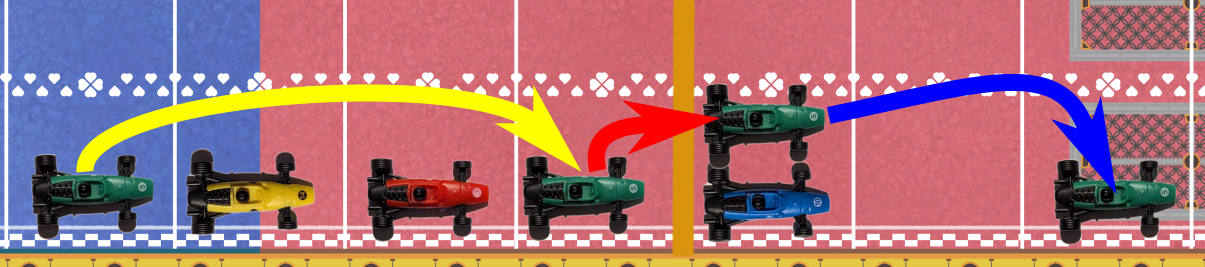
Anti-Gravity Spin Boost
This rule modifier replaces the standard slipstream rule. You don’t use both in a race. Use Spin Boost on the phase you would normally slipstream.
The whole track has become a frantic, gravity defying speed loop! Racers hover round at blistering speed gaining anti-gravity Spin Boosts as you pass other pilots. This means that when you collide with other racers, you instead spin past, gaining an extra bit of movement as you do.
In this mode, if you finish your movement one space behind, beside or in front of another racer you may Spin Boost to the position two spaces in front of their car on the track (always move to the space two ahead of them no matter if you were originally behind, beside or in front). If you are now behind, beside or in front of a different car you may repeat this process until you choose not to. This counts as free movement but you must still do the corner speed check based on the original cards you played when going through a corner.
You MUST move two spaces clear when Spin Boosting but if that space is blocked (4 cars full), or it would cause you to take the corner too fast for the heat you have, then you cannot do that Spin Boost.
Shortcut
It wouldn’t be a kart racer without the use of a good shortcut or two… This module introduces the ability to skip past the corners in certain circumstances with the use of two shortcut tokens.
Use any two items included to act as your shortcut tokens. We like to use the mushroom to add to the karting theme.
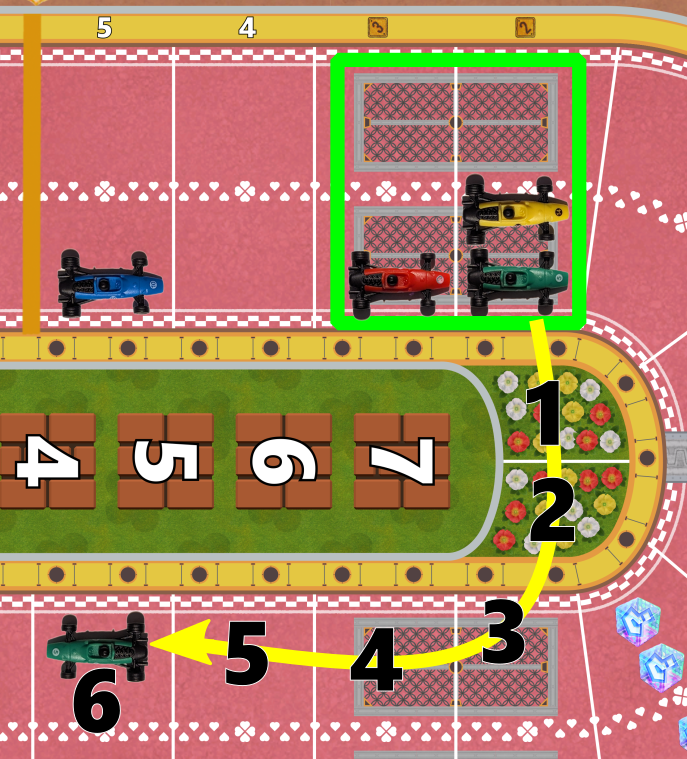
If at the end of your turn, you are stopped on either of the metal grid spaces before the corner you may spend a shortcut token on your next turn and drive over the shortcut and out the other side. The shortcut consists of two spaces as highlighted below. Move the values of this turn’s normal speed total, adding any boosts, adrenaline etc. as you go. Remember that the shortcut itself is always two spaces long.
NOTE – If you cannot make it past either of the two shortcut spaces then you don’t take the shortcut and must instead move towards the corner as normal. Example – Needing a four to make the shortcut but you only have a total of 3, with no boosts available. This would place you on one of the shortcut spaces and this is not a valid move. If an item in ‘Super Kart Mode’ (described below) stops you taking the shortcut, move behind the corner line instead and drop to 1st gear (don’t take extra stress).
The Green, yellow and red cars start in one of the metal grid sections, meaning they may take the shortcut. Blue cannot.
Super Kart Mode
It wouldn’t be a frantic dash round and round Baby Park without the use of weapon items. Included in this fan expansion are 24 ‘Set A’ items and 46 ‘Set B’ items.
NOTE – We recommend not using the Legends for this mode, but feel free to experiment and add them and decide whether to have them affected by items or not.
Setup
- Choose any of the base game modules to add to your race (eg. weather, upgrades, sponsorship etc.)
- Decide on the number of laps. 5 is recommended and place the lap counter on that number.
- Place Set A and Set B items face down on the appropriate space on the board.
- Decide to use slipstream or the new anti-gravity Spin Boost described above.
- Choose whether Ghosts target a random player or, for a more aggressive game, a specific player.
During your turn if you drive on or past any of the ? block item spaces and don’t already have an item, draw from one of the two item piles based on your track position at the start of that turn.
2 player race:
Player in 1st – draw from Set A.
Player in 2nd – draw from Set B.
3 or more players:
Player in 1st and 2nd – draw from Set A.
Players in 3rd and down – draw from Set B.
Place your item face down in front of you and use it on any subsequent turn (unless otherwise stated).
You can only carry one item and can use it any turn after you picked it up. You may use the item even if it would otherwise have no effect (example throwing a green shell to an empty track just to get rid of it).
To use an item, reveal it on your turn after you’ve selected gear and played cards face down but before you move (effectively using an item at the same time that you reveal your cards). If your item targets another player, place it face up in front of them, behind any other items targeting them. Items targeting other players are resolved in the order they were placed. Only one negative speed value can affect a player in a turn.
You may choose to save your item for a later turn or, when another player’s item is targeting you, you may choose to block that attack. Here, either use your item normally and still take the hit, or use it defensively instead. You may use an item to block attacks if it has one of the following shield icons:

Cracked Shield
This blocks and discards one item targeting you. Discard your item and the one targeting you. If another item is still targeting you, it hits you and you must take the effect.
You can choose to use your own item without blocking, in this case you are still affected by the one targeting you but get the benefits of your own too. Think of it like firing your weapon just before the targeting item impacts you. Use this to your advantage! When targeted you can’t save these items for later.

Shield with Star
The shield with the star means it destroys all items targeting you. Instead, you may choose to take the hit from the first item attacking you and then use your item, or save it for later.
You can only be hit by one item per turn. If you are hit, discard all other items targeting you.

Green Shell
Hits the player directly in front of you on the same sector. The targeted player moves -2 speed on their next turn. If there are no players in front of you before the corner, this item can still be used but it misses the target and is discarded.

Red Shell
Hits the player directly in front of you even if they are round the next corner(s). The targeted player moves -2 speed next turn. If you are in 1st place, you can still play the red shell but it misses the target and is discarded.

Blue Shell
Targets the player in first place at the time you use it. That player moves -4 speed next turn (cannot be negative so if their total is 4 or less, they move 0).

Mushroom
Add +2 speed to your total OR take the shortcut as described in the Shortcut rules of this fan expansion.

Star
Block and discard all items targeting you and move up to +2 speed. OR block and discard items and take the shortcut as described in the Shortcut rules of this fan expansion.

Horn
Block and discard one item that is targeting you. Does not block the ink, lightning or ghost items. If anyone is within one space of you, choose one of those players and they move -1 speed next turn. You may instead use the horn if you would end up on a banana space to destroy the banana and allow the use of boost adrenaline, slipstream/Spin Boost etc. If choosing to remove a banana, players within one space are not hit.
Banana
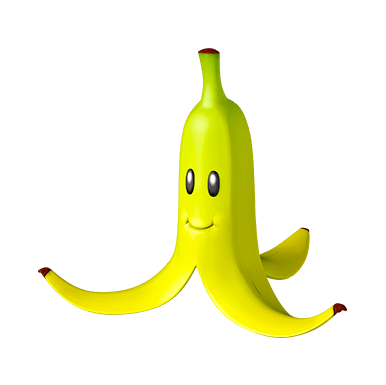
Place a banana on the racing line of any unoccupied space that you drove through on the turn you played it. A player ending their movement on a banana space cannot use adrenaline, boost or slipstream/Spin Boost. You can use a horn to get rid of a banana that is on the track.

Ghost
Choose a player with an item and steal it from them. You decide as a group to choose randomly or target specific players (unless 2 players). Stolen items can be used any turn after this one. It is possible to use a ghost to steal a ghost!

Lightning
All players ahead of you on track immediately discard the item they are carrying. The player in 1st position moves -2 speed. All items targeting all players (including your own) are discarded.

Ink
When revealed, all other players immediately draw cards from their draw pile until a speed card is revealed (1 to 4). That card must be used on their next turn as part of the total cards played for the gear they choose. I.e. the affected player(s) use one less card from their hand due to this being in play. If another ink is revealed, anyone still to use their ink-drawn card is unaffected this time.

Bullet Bill
Move directly to the space behind the next corner (cannot be used if you are already in that space). Adrenaline or boosting cannot be used but you may slipstream/Spin Boost through the corner if possible and you do not pay any heat to do this. You discard or draw back into your hand the cards played before revealing this item. Bullet Bill cannot be used to cross the finish line on the last lap.

Coin
If you collect a coin, immediately reveal it and bank it near your player board. Once you have banked three, play it like a normal item on one of your later turns and gain +2 speed. You cannot carry other items if you have 3 coins banked. Ghosts cannot steal coins and lightning does not affect them either.
Remember – A player can only be affected by one item placed in front of them per turn. Example: Green is targeted by a Red Shell (-2) and Blue Shell (-4). The Red Shell was placed there first and successfully hits. This means the Blue Shell’s impact does not affect the player and they move -2 this turn.
BONUS MODES!
For extra karting chaos, shuffle Set A and Set B items together and all players draw from the same pile. Alternatively, print out more of the items you like and customise the amount of each item for any and all players exactly to your liking!
Finding the item punishment too lenient? Try having players drop to 1st gear when they are hit. This adds some more weight and strategy to the impacts. Your own house rules and ideas are very welcome with this fan expansion too.
Lapped cars at the end
Choose to let lapped cars complete their full race OR decide to have them end the race when they next cross the finish line after the winner (they do not place higher than non lapped cars). Players lapping other cars may use them for anti-gravity Spin Boosts. Optionally, you could give lapped cars a Bullet Bill for free to get them back in the game. It is a kart racer after all!
And that’s it folks. Happy karting and please let me know of any feedback or how you got on with any / all of this fan expansion. Thank you for playing my game!
CREDITS
Track and rules design – GreenyRob85
Playtesting – AlyLouYeah
Made in Inkscape.
This is a fan expansion for the board game ‘Heat: Pedal to the Metal’ by Asger Harding Granerud and Daniel Skjold Pedersen.
Track elements from Logicwarrior on BoardGameGeek. Some textures from this Free 3D Baby Park Model.
Please use any and all components from this expansion to make your own version but it must not be reproduced for commercial use.
GreenyRob85
For Dillon
x
Links to files
Fanmade Baby Park board (png)
Heat Super Kart Mode version 1.0 rules (pdf)
Baby Park files (6x A4 prints, items, item references and full track png)
 Sidestep To Your Left
Leave a comment